

Funnels
Build multistep conversion funnels in Clics: steps, filters, conversion windows, and drop-off charts.
Funnels show how visitors move through a sequence of steps and where they drop off. Open a project → Funnels in the dashboard.
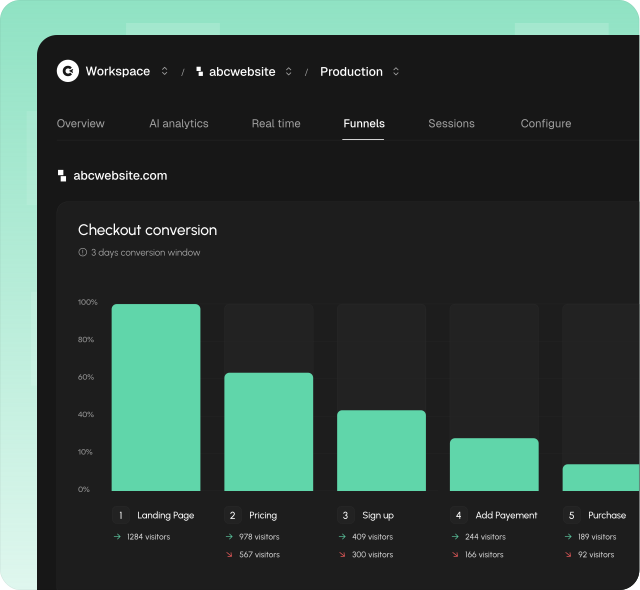
What you see
- Title: Funnels, with a short note on steps and drop-off
- Date range: same presets as Overview (default Last 7 days)
- New funnel: opens a right-hand sheet
- Funnel cards: one per funnel: name, conversion window, chart, step metrics, Edit / Delete
There is no separate funnel detail URL: create, edit, and results all live on this page.
Empty list: No funnels yet.
Create a funnel
- Click New funnel
- Set a Name (e.g.
Signup flow) - Set a Conversion window limit (default 3 Days: seconds, minutes, hours, days, weeks, or months)
- Define Steps (min 2, max 7 for results)
- On each step, add ≥1 filter with values, then Save
Visitors who don’t finish every step inside the conversion window count as drop-offs.
Steps and filters
Default step names: Step 1, Step 2, … Use Add step / Add filter. Filters on a step are combined with AND (UI connectors: where / and).
| Filter type | Examples |
|---|---|
| Page | Landing or mid-funnel paths |
| Event | Exact track() event name |
| Country, Device, Browser, OS | Audience constraints |
| Hostname, Referrer | Site / source |
| UTM source / medium / campaign / term / content | Campaign attribution |
Operators: equals, does not equal, contains, doesn’t contain.
If a step has no filters with values: add filters and save before results appear.
Reading results
Each card shows a step chart. Toggle layout under Graph display options:
- Left to right (default)
- Top to bottom
Step metrics
| Meaning | |
|---|---|
| Step 1 | Entered: visitors who started the funnel |
| Later steps | Converted count (+ %), dropped off (+ %), median time from previous step |
| Hover | Converted, Dropped off, Conversion so far, Conversion from previous, Median / Average time from previous |
No visitors in range: message that no one completed the funnel in the selected period.
Environments
Funnels are scoped per production / development environment. Test definitions in development first.
Tips
- Keep funnels focused: 3–5 steps work best for weekly reviews
- Prefer exact page paths or event names you already send with Custom Events
- Use the same date range habits as Overview
API and MCP
list_funnels,get_funnel,create_funnel,update_funnel,delete_funnelquery_statsfor programmatic funnel analysis
See API Reference and MCP.