

AI Analytics
Measure referral traffic from ChatGPT, Claude, Perplexity, Gemini, and Copilot in the Clics AI Analytics view.
AI Analytics is a dedicated project view for traffic referred by AI assistants. Open a project → AI analytics in the dashboard.
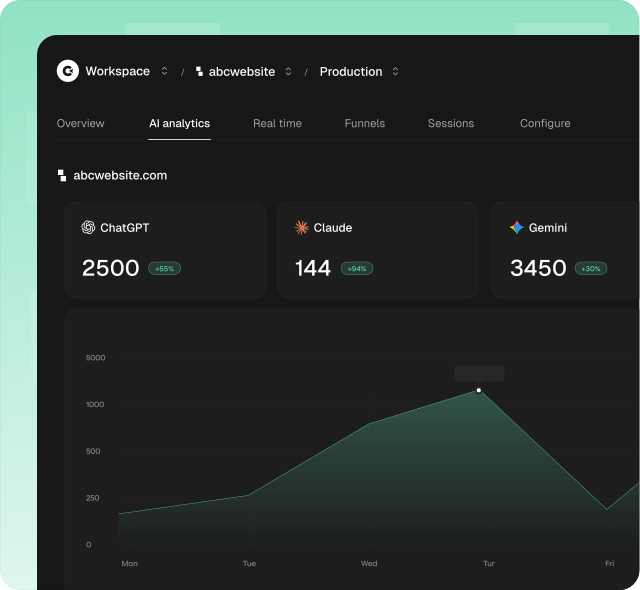
What you see
Top to bottom:
- Title: AI Analytics, with a short note on ChatGPT, Claude, Perplexity, Gemini, and Copilot
- Site header: favicon, website URL, and live active visitors (site-wide, not AI-only)
- Filter and date range: same date picker as Overview, with a reduced filter set
- Provider tabs + visitors chart: one tab per AI source, sorted by visitors
- Breakdown cards: pages, referrers/UTMs, countries, devices, browsers, OS for the selected provider
- Events card: custom events within that provider’s traffic (paid)
- Activity heatmap: yearly visitors or page views (site-wide, not AI-scoped)
How attribution works
Clics attributes visits when the HTTP referrer hostname matches a known AI product:
| Provider | Referrer host(s) |
|---|---|
| ChatGPT | chatgpt.com |
| Claude | claude.ai |
| Gemini | gemini.google.com |
| Perplexity | perplexity.ai |
| Copilot | copilot.microsoft.com, copilot.com |
Provider tabs and chart
Each tab shows:
- Provider name and icon
- Visitor total for the date range
- % change vs the previous period (hidden for All Time)
Select a tab to update the visitors time-series chart and all breakdown cards for that provider. Unlike Overview, there are no Page views / Session duration / Bounce rate tabs: the chart is visitors only.
Empty chart: No data for this period.
Breakdown cards
Scoped to the selected provider’s referrers:
| Card | What it answers |
|---|---|
| Pages / Hostnames | Where AI traffic lands |
| Referrers / UTM | Exact referrer / campaign detail within AI scope |
| Countries | Geographic mix of AI visitors |
| Devices / Browsers | Device and browser mix |
| Operating systems | OS breakdown |
| Events | Custom events from AI-referred sessions |
Date range and filters
Date presets match Overview: Last 24 hours, Last 7 days (default), Last 30 days, Last 3 / 12 months, Month / Quarter / Year to Date, All Time, or custom range.
Available filters: Country, Device, Browser, OS, Page, Hostname.
Not available (Overview has them; AI Analytics does not): Referrer, UTM fields, Event, Goal. Referrer and UTM cannot override the built-in AI scope.
Plan requirement
AI Analytics is a Business feature. Without it, the provider chart is overlaid with an upgrade prompt to Settings → Billing. Custom events on this page remain subject to the usual Events plan gating.
Track AI crawlers
Select AI crawlers in the view selector to analyze requests from crawlers whose user agent and source IP have both been verified. Follow the AI crawler tracking installation guide to create a project token and add the server-side package.
Why it matters
Traditional source reports often bury or miss AI discovery. This view isolates ChatGPT, Claude, Perplexity, Gemini, and Copilot so you can track volume, landing pages, and growth from AI-driven visits.