

Welcome to Clics
Clics is privacy-friendly, cookieless web analytics for visitors, sources, goals, funnels, sessions, and AI referrals, without cookies on your visitors or a second product to maintain.
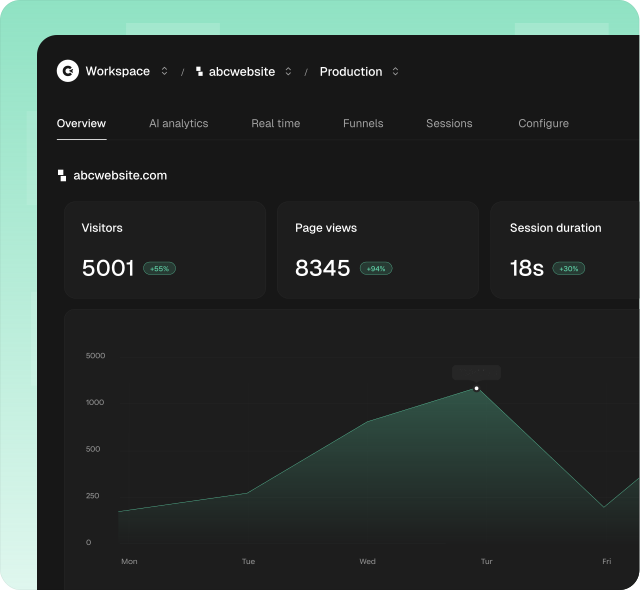
What is Clics?
Clics is the analytics layer between your site and the questions you actually ask:
- Who came this week, from where, and on which pages?
- Which campaigns and AI tools send traffic that converts?
- Where do visitors drop off in a signup or checkout path?
- What did one visit look like, page by page?
You install a lightweight tracker, open the dashboard, and optionally connect the API, SDK, CLI, or MCP when you want the same data in scripts and agents.
Because measurement is cookieless by design, many teams can ship analytics without an analytics cookie banner, and still keep goals, funnels, and session detail when they need depth.
Why use Clics?
Analytics often starts as “drop a script and glance at pageviews.” It grows into filters, UTM hygiene, conversion definitions, funnel steps, export jobs, agent access, and compliance reviews. You can build that yourself, or use a product shaped for it.
| Area | What teams usually end up owning |
|---|---|
| Traffic | Unique visitors, pageviews, bounce, session duration, realtime |
| Acquisition | Referrers, UTMs, countries, devices, browsers, AI sources |
| Conversions | Page and event goals, multistep funnels, conversion rates |
| Journeys | Per-visit sessions, landing/exit, activity timelines |
| Automation | REST API, TypeScript SDK, CLI, MCP for agents |
| Privacy | Cookie-free measurement, GDPR/CCPA-minded design, published DPA |
Clics keeps that surface in one place: a calm dashboard plus the same data over API when you need it outside the UI.
How is this different?
Compared to Google Analytics, Clics is cookieless by default and shaped for product and growth workflows without the usual GA complexity:
| Google Analytics | Clics | |
|---|---|---|
| Visitor cookies | Yes | No analytics cookies |
| Goals & funnels | Yes | Yes |
| Session detail | Limited / complex | Yes |
| AI referral views | No | Yes (AI Analytics) |
| Agents / MCP | No | First-class (MCP) |
Clics does not replace your product database or your CRM. It answers “what happened on the site?” so product and growth can decide without standing up another tracking stack.
FAQ
Do I need a cookie banner for Clics?
For standard cookieless measurement, many sites can skip an analytics cookie banner. Always confirm with your counsel and the Data Policy. Other cookies on your site are separate.
Do I still get conversion analytics?
Yes. Create goals (page or event) and funnels. Custom events use track(). See Custom Events.
Can I use Clics from CI or an AI agent?
Yes. Paid plans unlock API keys for the REST API, TypeScript SDK, CLI, and MCP (local or remote).
Where does my data live, and who owns it?
You own your site analytics data. Collection and subprocessors are described in the Data Policy and DPA.
How do I get started?
Create a workspace on platform.clics.dev (30-day trial, no credit card), install the tracker, then verify data on Overview. Step-by-step: Get started.
Next steps
| Go here | When you want to… |
|---|---|
| Get started | Create a project and install the tracker |
| Installation Guides | Framework-specific setup (Next.js, Astro, …) |
| Dashboard | Learn Overview, sessions, goals, and funnels |
| MCP | Connect Cursor, Claude, ChatGPT, and other agents |
| TypeScript SDK | Query stats and manage resources in code |
| Billing | Plans, events, and API access |
Need a human? Email contact@clics.dev or use in-app chat from the dashboard. Replies typically under 30 minutes.